General Studios / Cat Generator
Power
A generator room that actually runs.
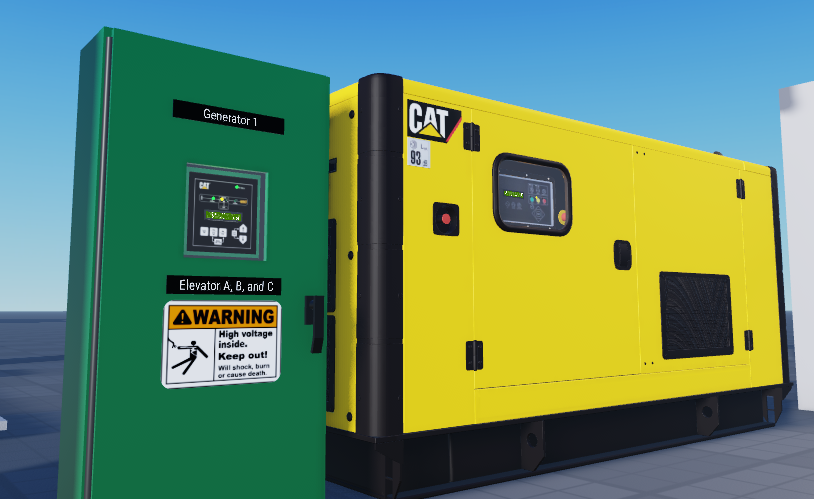
An EMCP-style genset controller with a simulated engine, real start sequencing and load response, plus a live LCD panel. It comes with an ATC-300-style transfer switch that starts the set when the utility fails.
- Auto / Manual / Stop
- Live LCD panel
- Transfer switch included
Drag to rotate
What's in it
A whole power system, not a prop.
The generator and its transfer switch are two controllers that talk to each other, so a power cut plays out the way it would in a real building.
A real start sequence
Start delay, cranking with automatic retries, ramp-up and warm-up before the set comes on line, then a cooldown and wind-down on stop.
Live LCD panel
Pages for output power, voltage, current and frequency, engine speed, oil pressure, coolant temperature, battery, fuel level and run hours.
Auto, Run and Stop
Panel lamps show the mode and the engine state. In Auto the set starts and stops from the transfer switch's signal.
Alarms and shutdowns
Warnings and latched shutdowns take over the screen, blink until acknowledged, and sound the horn.
Emergency stop
Click the mushroom button on the cabinet to cut fuel immediately. Release it to twist it back out and reset.
Real load response
Change the connected load and speed and voltage dip and recover, the way a real set takes block load.
Transfer switch included
An ATC-300-style switch with Help, Up, Down, Enter, Engine Test, Bypass and Alarm Reset buttons that work, and a screen you can click to zoom.
Sound and smoke
Warning horn, crank and running audio, a wind-down on stop, and exhaust smoke from the stack.
Easy to script against
Status values and model attributes (RPM, voltage, kW, fuel, state and more) make it simple to wire into your own scripts.
When the power goes out
From utility failure to load back on the grid.
This is the sequence the two controllers run through on their own.
- Utility failsThe transfer switch sees the loss of source and starts its timers.
- Generator is calledThe switch signals the generator to start. The generator must be in Auto for this to work, just like the real thing.
- Engine comes upStart delay, cranking, ramp-up and warm-up. If it fails to catch, it retries before alarming.
- Load transfersOnce the generator is ready, the switch moves the load across to it.
- Utility returnsThe switch waits, transfers back to utility, and the generator runs through its cooldown before stopping.
In Roblox
See it in the world.
Good to know
Before you buy.
One purchase, every game you own
Your license belongs to your Roblox account or group. There are no keys to manage or per-game setup.
Turn on HTTP requests
The license check needs Allow HTTP Requests switched on in your game's security settings.
Generator and ATS together
They pair automatically: the switch finds the nearest generator, or you can point it at one explicitly.
Ready when you are.
Buy Cat Generator once on the Product Hub and use it in every game you own.